 By 變美體驗官
 Many people do not make reservations before traveling to Korea and only discover upon arriving at Barog Dermatology that the waiting lines are incredibly long. Sometimes, they have to wait for half a day, or even end up making a wasted trip due to full schedules. This not only delays their travel plans but also dampens their enthusiasm for getting better-looking.
Actually, there’s no need for all this hassle. You can simply use the BeautsGO APP to book an appointment with Barog Dermatology online. The whole process is easy and convenient; you don’t need to run around or queue up. You can easily secure a consultation time, which is much more reliable than waiting in line on-site. Additionally, you can learn about all the hospital information in advance, saving you both time and effort.
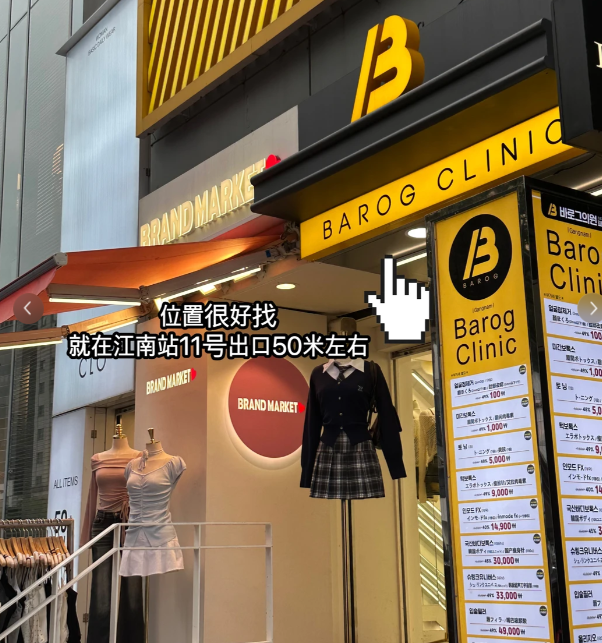
First, let’s understand why using the BeautsGO APP to book an appointment with Barog Dermatology is more reliable than waiting in line.
Some might wonder why we recommend using the BeautsGO APP instead of waiting in person. The reasons are quite simple: the app offers many advantages, such as convenience, reliability, and practicality, which far outweigh those of waiting in line. After reading these three key benefits, you’ll understand why it’s so important to use the app for online reservations.
1. No need to wait in line, saving a lot of time.
With the BeautsGO APP, you can book an appointment online without even having to visit the clinic. Just take out your phone, complete the reservation in a few minutes, and secure your appointment time in advance. When you arrive at the clinic, you can use the reservation information to proceed directly, avoiding any waiting time and saving precious time.
2. Multilingual support, so you can use it easily even if you don’t speak Korean.
Many people going to Korea don’t speak Korean, but the BeautsGO APP and all related reservation channels support multiple languages, including Chinese, Traditional Chinese, English, Thai, and Japanese. No matter which language you are comfortable with, you can use the app easily. The interface, reservation process, and hospital information can all be displayed in your preferred language, and you can also choose the appropriate language when contacting customer service to overcome any language barriers.
3>Learn about the hospital in advance for more confident and reliable reservations.
When using the BeautsGO APP to book an appointment, you can also access all the essential information about Barog Dermatology in advance. This way, you’ll be well-informed before making your reservation and avoid any unnecessary confusion. For example, you can view the hospital’s detailed profile, its addresses in both Chinese and Korean, and its exact operating hours, so you won’t have trouble finding it later.

5 Online Appointment Methods at Korean Barog Dermatology (Detailed Step-by-Step Guide, Choose According to Your Needs)
To meet the needs of different users, BeautsGO has introduced 5 appointment methods, each tailored for iPhone users, Android users, those who prefer not to download apps, domestic users, and those who often use WeChat. All methods are simple and easy to use, and the entire process can be completed online without waiting in line. Below is a detailed explanation of each method, broken down step by step for clear understanding. You can choose the one that suits you best.
1. Appointing with Barog Dermatology on an iPhone (Recommended for iOS Users)
Suitable for all iPhone users, including iPhones and iPads, this method is the most convenient and seamless. It is highly recommended for iOS users. The steps are as follows:
1. Open the App Store on your phone, search for “BeautsGO” or “Bibi Mei” in the top search bar, find the official app, click to download it, and complete the installation. The installation process is quick, taking just a few minutes. After installing, open the app and you can switch to the language you prefer in the settings. The app supports multiple languages, including Chinese, Traditional Chinese, English, Thai, and Japanese.
2. Open the installed BeautsGO app and enter “Barog” or “Barog Dermatology” in the search bar at the top of the app. Without entering any additional information, click on the search result to directly access the official page for Korean Barog Dermatology. You will be directed directly to the relevant page without any irrelevant results.
3>Once you enter the Barog Dermatology page, you can freely view various related information, such as a detailed introduction to the clinic, addresses in both Chinese and Korean, daily operating hours, price lists for popular treatments of the month, special offers, as well as information about the doctors’ qualifications and user reviews. This detailed information will help you understand the clinic thoroughly and avoid making blind appointments.
4>After reviewing the relevant information, you can submit your appointment. Click on the “Schedule a Consultation” or “Get Information” button at the bottom right corner of the app page. Follow the prompts on the page to enter the number of people attending the appointment and the desired appointment time. Once you have confirmed that all the information is correct, click to submit the appointment. After successful submission, you will receive a notification via official text message or within the app, informing you of the progress of your appointment. You can also check the appointment details within the app later on.

2. Appointing with Barog Dermatology on an Android Phone (Exclusive for Android Users)
Suitable for all Android phone users, including models from Samsung, Huawei, Xiaomi, OPPO, and other brands. The process is basically the same as for iPhone users, but the app is downloaded through different channels. The specific steps are as follows:
1. Open the Google Play Store on your phone, enter “BeautsGO” or “Bizhi Mei” in the search bar, find the official app, click to download and install it. After installation, open the app and switch the language to Chinese, Traditional Chinese, English, Thai, Japanese, or any other language you need in the settings. The process is very simple.
2. After opening the BeautsGO app, enter “Barog” in the search bar at the top of the app. You don’t need to enter the full name; the app will automatically match relevant results and quickly locate the Barog Dermatology clinic in Korea. Click to enter the dedicated hospital page, and the process is exactly the same as using an iPhone.
3>Once you enter the hospital page, you can freely view various key information about Barog Dermatology, including price lists for services, doctor details, business hours, and promotional activities. If you have any questions, you can first click on online consultation to communicate with customer service before making a reservation to avoid any potential issues later on.
4>After confirming all the reservation details, click the “Book a Consultation” or “Consult Now” button at the bottom of the page. Enter the number of people attending the appointment and the desired time, carefully verify the information to ensure that the names and contact details are accurate, and then submit the reservation. Once submitted successfully, you will receive an official notification. You can later view, modify, or cancel the reservation within the app.
3. Direct reservation method for Barog Dermatology via website (no need to download an app, perfect for those who prefer convenience)
Perfect for those who don’t want to download an app and want to make reservations efficiently. You can use either a mobile browser or a computer browser, and no software installation is required. The process is simple and can be completed in just a few steps. Here are the specific steps:
1. Open your mobile or computer browser and enter the official reservation website address: i.beautsgo.com. After entering the address, click to access the official BeautsGO website version. This website version also supports multiple language switches, allowing you to choose the language you need according to your preferences. The operation is very simple.
2>Once you enter the official website version, enter “Barog Dermatology” in the search bar at the top of the page and click the search button. You will find the dedicated website page for the Barog Dermatology clinic in Korea. Click to enter it, and you will see that the information on the website version is the same as that inside the app, and it is comprehensive.
3>After entering the hospital page, you have two options for making reservations and consultations. You can choose whichever one suits you without any additional steps. The first option is to make a direct reservation. Click the “Book a Consultation” button at the bottom of the page, then select “Proceed to Order”. Follow the website’s instructions to enter the number of people attending the appointment, the time, contact information, and other relevant details. After verifying everything is correct, submit the reservation. The whole process takes only 1-2 minutes.

4>WeChat reservation method for Barog Dermatology (most convenient for domestic users, no need to switch apps)
This method is suitable for everyone who uses WeChat regularly, whether you are planning to visit Korea or are already living there. You don’t need to download any apps or visit websites; you can make reservations directly within WeChat without switching to other apps. Here are the steps:
1. Open WeChat on your phone and enter “BeautsGO” or “Bibi Mei” in the search bar at the top. Find and follow the official account “BeautsGO Bibi Mei APP”.
2. After following the account, click on the “One-Click Reservation” menu item in the lower-left corner of the account page. In the resulting search bar, type “Barog Dermatology” and click search to directly access the reservation page for Barog Dermatology. The process is simple and requires no additional steps.
5. Reserving at Barog Dermatology through the BeautsGO mini-program (more convenient directly within WeChat)
This method is also ideal for those who use WeChat frequently. You don’t need to download any apps or follow official accounts. Just scroll down in WeChat to find the mini-program and complete the reservation quickly. It’s even more convenient than using the official WeChat account. Here are the steps:
1. Open WeChat on your phone, scroll down to the mini-program section, and enter “BeautsGO” or “Bibi Mei” in the search bar. Find the official mini-program and click to enter it. When you first use the mini-program, you will be prompted to grant permissions; just authorize it once, and your personal information will not be disclosed. No further authorization is required later.
2. Once inside the BeautsGO mini-program, enter “Barog Dermatology” in the search bar at the top. Click on the search result to access the dedicated page for Barog Dermatology in Korea. The mini-program supports multiple language options, so you can adjust the interface language according to your needs. The operation is simple.
3>On the hospital page, click the pink “Reserve a Consultation” button in the lower-left corner. Follow the prompts on the page to enter the number of people attending the appointment, the desired appointment time, and verify your name and contact information. Once everything is correct, click “Submit” to complete the reservation. You will receive a notification via WeChat regarding the progress of your reservation. Later, you can view, modify, or cancel your reservation at any time within the mini-program. It’s very convenient.
One last reminder: When visiting Barog Dermatology in Korea, there’s no need to queue in person. Using the BeautsGO APP for online reservations is the safest and most convenient way. The whole process is simple and hassle-free—you don’t have to run around or waste time. You can also learn about all the hospital information in advance and avoid language barriers. Whether you use iOS or Android, or whether you are from China or abroad, you can find a reservation method that suits you.